Condo operations, on autopilot · Built in Canada

Your building,
on autopilot.

From the front desk to the boardroom, every part of running your condo lives in one calm, intelligent system — and everyone sees exactly what matters to them.

Every package, visitor and key — sorted before anyone has to ask.

Hover a floor to see how each team works

The Problem

Building management software
hasn't evolved in fifteen years.

01

Five tools, none of them talk.

Packages live in one app, maintenance in another, security in a third. Your staff copies the same number into the same field, five times a day.

02

Built for the desk, not the building.

Yesterday's software was designed for office computers. Your concierge is on a phone at the front desk, dealing with a resident, a courier, and a contractor at the same time.

03

Residents downloaded the app once.

They opened it twice. Now they call the front desk for everything. The app was never the problem. Twelve apps for twelve things was.

So we built something else.
What it does

Everything it takes to run your building.

The day-to-day of running a condo — handled in one connected system.

Packages
Front desk · today
23 waiting
Unit 1204 · Sarah ChenAmazonjust nowReady
Unit 802 · Marcus TanakaFedEx9m agoNotified
Unit 1610 · Luis RodriguezUPS1h agoPicked up
Resident notified ✓
Packages & deliveries
The same system, your job

Log in, and it rearranges around you.

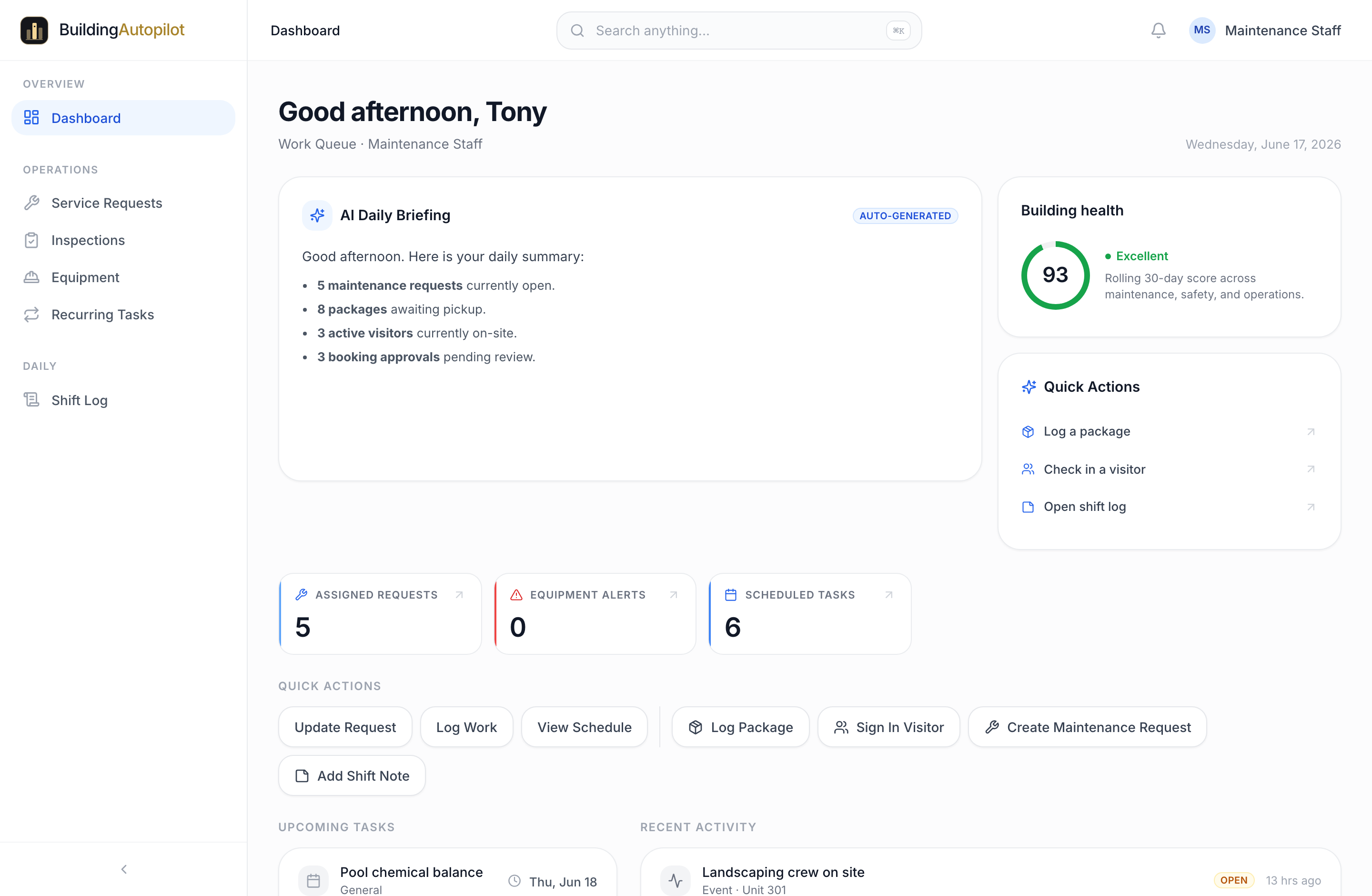
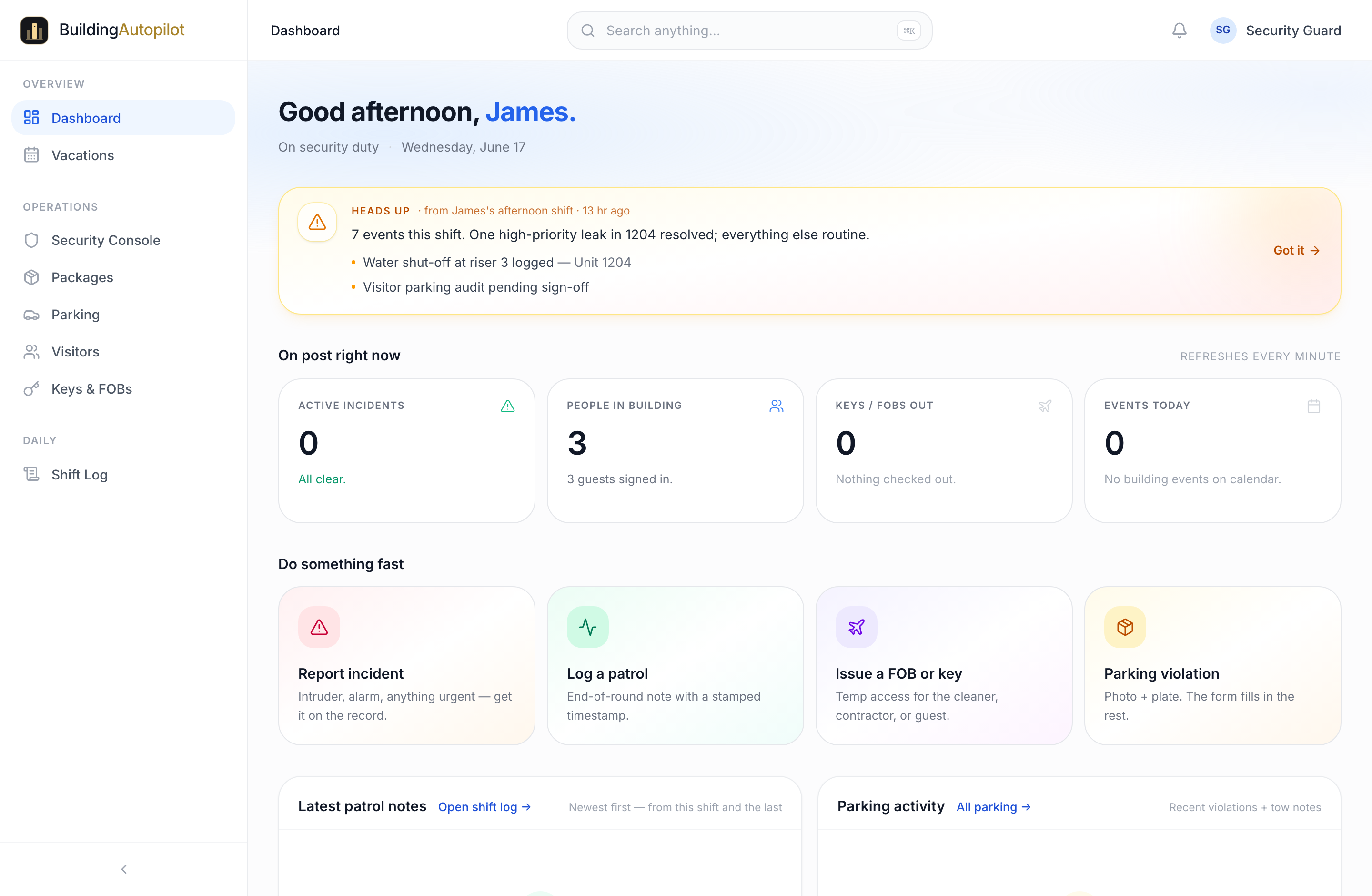
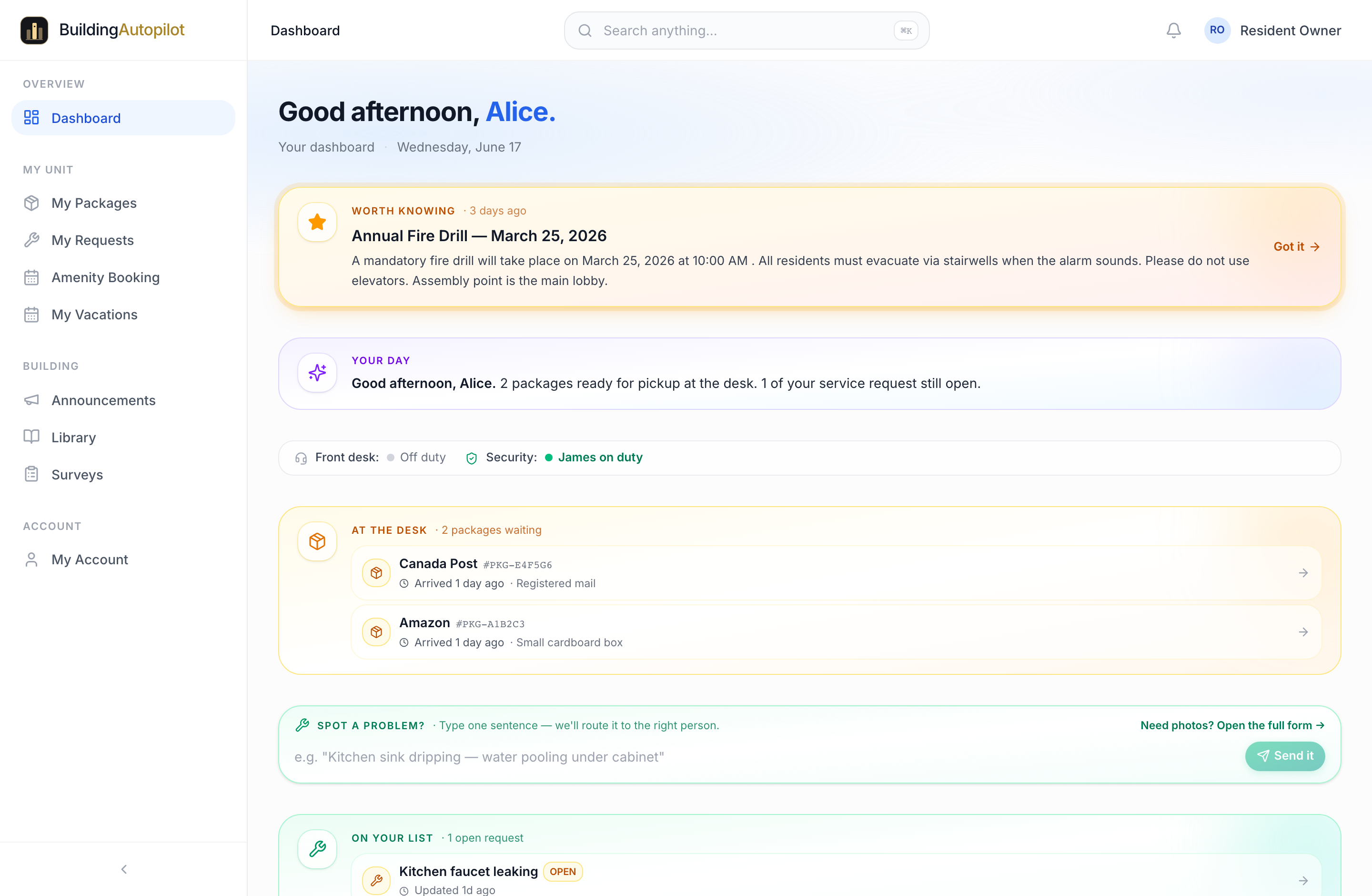
One platform, but never one-size-fits-all. Every person signs in to the screen they already live in — their data, their tools, nothing they’d miss. These are the real workspaces, not mock-ups.
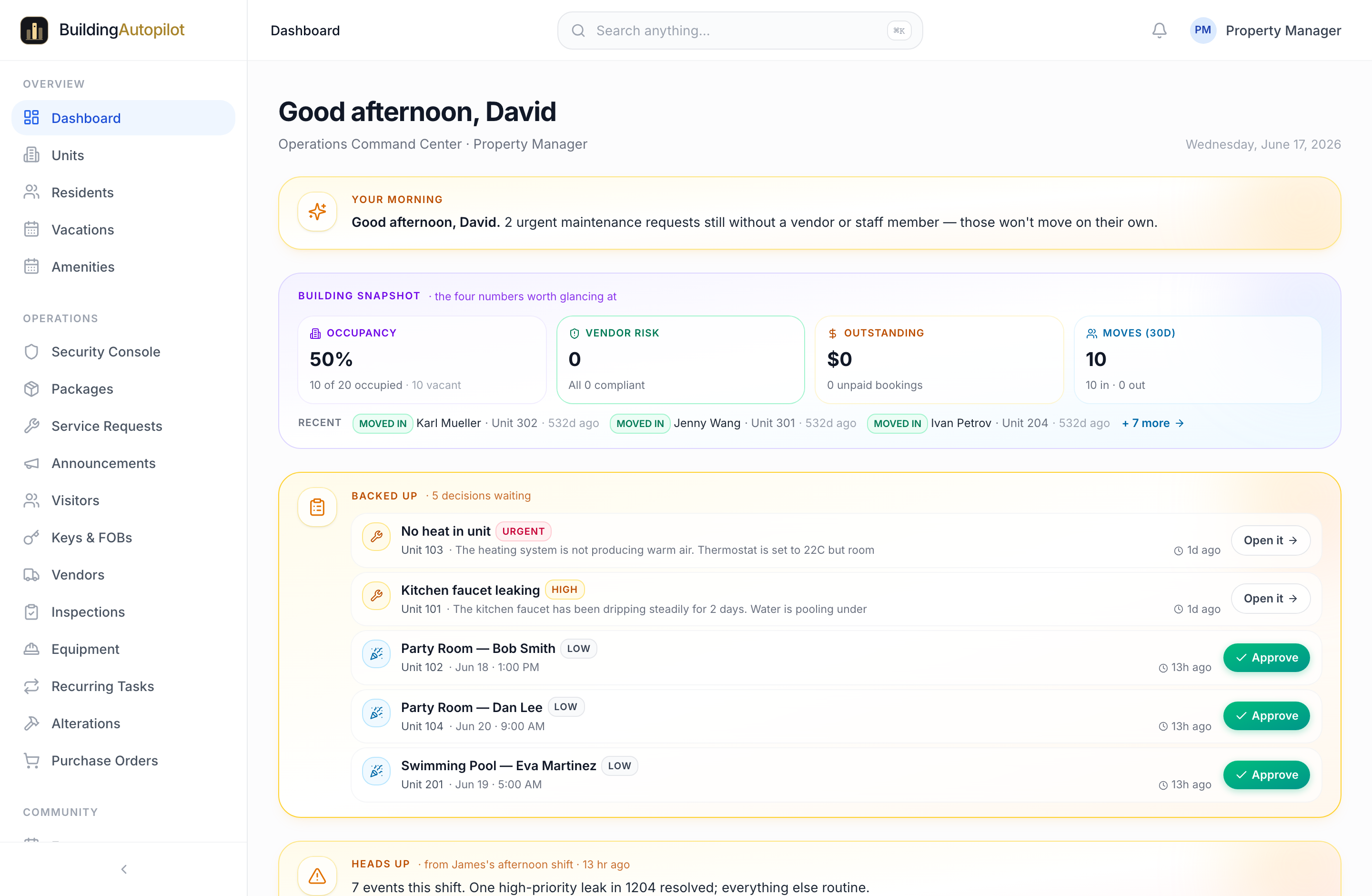
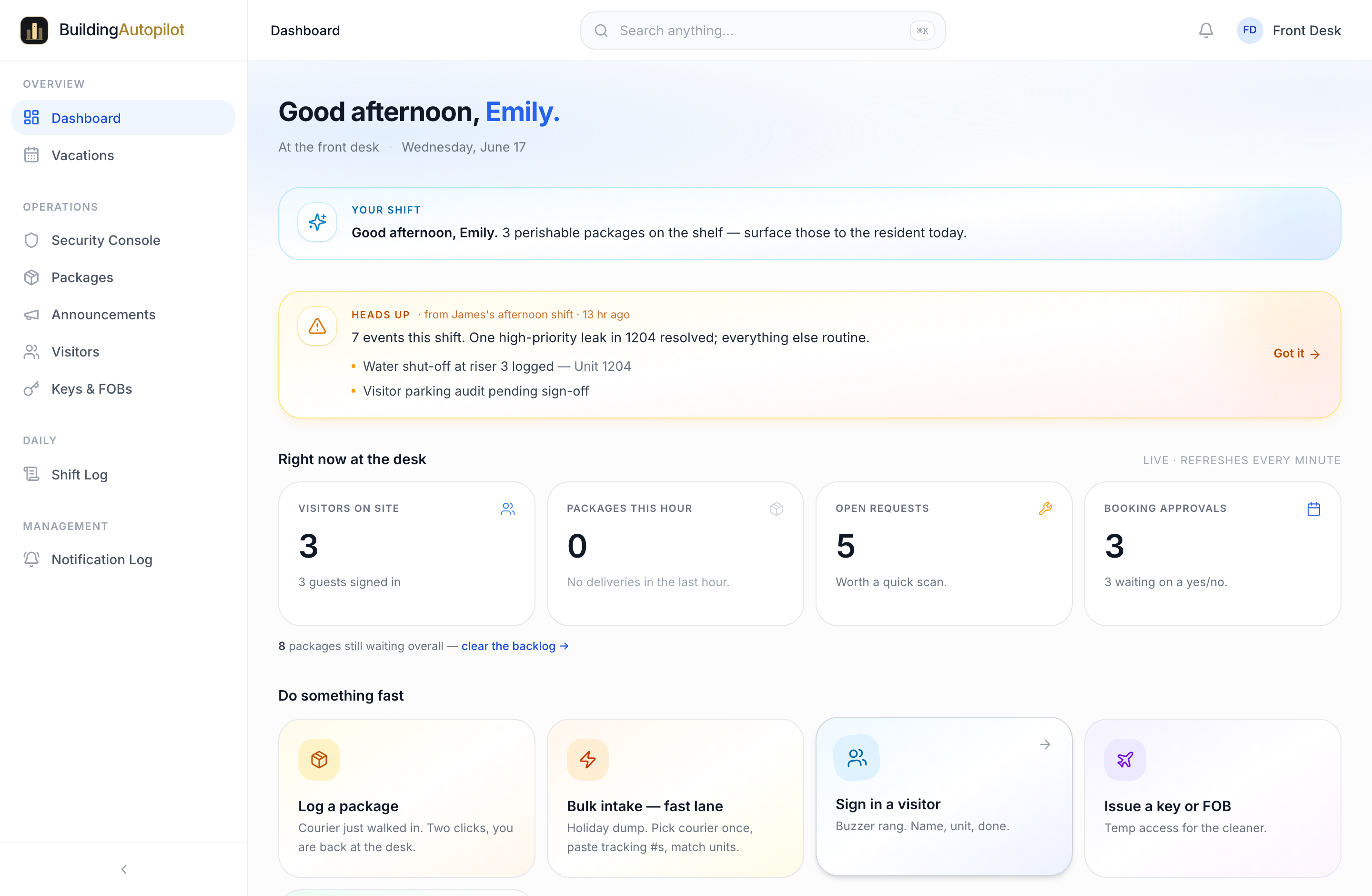
The Property manager dashboard in BuildingAutopilot — David · Property ManagerThe Front desk dashboard in BuildingAutopilot — Emily · Front DeskThe Maintenance dashboard in BuildingAutopilot — Tony · MaintenanceThe Security dashboard in BuildingAutopilot — James · SecurityThe Resident dashboard in BuildingAutopilot — Alice · Resident
David · Property Manager — the real dashboard, exactly what they see when they log in.

Our approach

Software that respects
your intelligence.

Three rules we wrote down before we wrote any code, and that every screen has to pass. They are why a brand-new concierge can log their first package in under a minute and a board member can open the platform once a quarter and still know what to do.

New
Log a package
Recipient
Sarah Chen · Unit 1208
Courier
Amazon
Tracking number
TBA0421984302
Storage
A · slot 4
Type
Standard
Resident gets a push, an email, and an SMS.
One primary action. Nothing competes for attention.
01Rule

One action per screen.

Every screen has one thing the user came to do. No mystery-meat navigation. No buried buttons. Your staff shouldn't need a manual to log a package or check in a visitor.

02Rule

One design language.

Packages, maintenance, parking, security: they all look and feel the same. Learn one screen and you've learned them all. Onboarding a new staff member is hours, not weeks.

Packages
Sarah Chen · Unit 1208
Amazon · 2m ago
New
Visitors
Cleaning service · Unit 904
Expected 2:30pm
Pre-auth
Maintenance
Hot-water leak · Floor 9
Reported 14m ago
High
SC
Sarah Chen
Owner · Unit 1208 · Floor 12
Active
Packages
2awaiting
Requests
0open
Bookings
1upcoming
Recent activity
Amazon package logged2m
Guest pre-authorized1h
Party room booked for Sat3h
03Rule

The data sits where the work is.

No more switching tabs. Resident history, package logs, maintenance records, and visitor data surface right next to the action that needs them. In context, not in a separate report two clicks away.

For residents

Installable on iPhone and Android. Native apps in private beta.

Residents add BuildingAutopilot to their home screen in two taps. Packages, maintenance requests, and amenity bookings live in one place — not buried in three different buildings' apps.

  • Push notificationsA package arrives, a request gets an update, a booking is approved — instant alert.
  • Biometric unlockFace ID and Touch ID on iOS. Fingerprint on Android. Tokens never leave the secure enclave.
  • Made for residentsNot a watered-down admin view. Designed for the one person it serves: the resident with their phone.

iPhone: Open the BuildingAutopilot URL in Safari → tap the share icon → "Add to Home Screen."
Android: Open in Chrome → menu → "Install app."

Tuesday
Good morning, Alice.
Packages
2
awaiting pickup
Service requests
1
open · in progress
Upcoming bookings
1
amenity reserved
Home
Packages
Requests
Account

The shape of it

Small numbers,
big surface area.

Most platforms in this space brag about modules. We brag about what it takes to get work done. Every number on this page is measured against an actual workflow our team runs in the product, not a marketing roundup.

0
Modules

All integrated, all sharing the same data.

0
Roles

Each one gets a tailored dashboard, not a one-size-fits-all view.

0s
To log a package

From courier scan to resident notification.

0
Login

Replaces the twelve your team juggles today.

Why we built this

We sat behind a front desk for a week.
Then we watched a property manager tab between five tools to release one package. That is when we knew the category was broken at the seams, not at the surface.
BA
Founder, BuildingAutopilot
Built in Toronto, Canada

See it on your building

One demo.
Zero spreadsheets.

We will sit with your team, walk through how your building runs today, and show you exactly how BuildingAutopilot handles each piece. Thirty minutes. No deck. No nonsense.

What you get
  • A 30-minute walkthrough of every module, with your data if you have it.
  • A migration plan from whatever you run today.
  • A pilot in one building, no contract, before you commit.
Demos this week typically book within 24 hours.